What Are Internal Links?
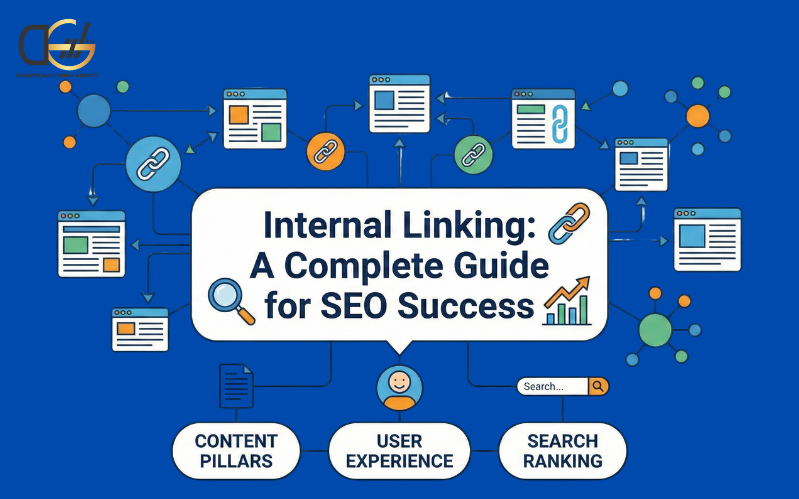
Internal links are hyperlinks that connect one webpage of your website to another on the same domain. Unlike external links, internal links for SEO keep visitors on your site longer, improve content discoverability, and strengthen your website’s authority.
Types of internal links include:
- Navigational links: Menus, headers, and footers that guide users through your website and highlight your main pages.
- Contextual links: Links within your content that provide additional value, pass link authority, and connect related pages.
- Breadcrumb links: Show the path from the homepage to the current page, improving usability and search engine indexing.
Using internal links strategically ensures that search engines can crawl your website efficiently, index important pages, and recognize your site architecture.
Best Practices for SEO Internal Linking
Here are the best practices for internal SEO linking by DGSOL, which play a significant role in ranking.
1. Use Descriptive Anchor Text
Anchor text is the clickable text in a link. Always ensure it clearly describes the target page. For example, instead of “click here,” use “learn more about technical SEO” and link the keyword.
Pro Tip: It varies anchor text naturally while keeping it relevant to avoid over-optimization.
2. Link to and From Pages
It identifies high-priority pages such as cornerstone content, product pages, or high-converting service pages, and links them from other relevant content.
These tools are:
- Semrush
- Google Search Console
- Google Analytics
Pro Tip: Add links to deeper resources if bounce rates are high to ensure link equity flows efficiently.
3. Avoid Reusing the Same Anchor Text
Each anchor should point to a single, relevant page. So reusing the same anchor across pages can confuse search engines and reduce link relevance.
Pro Tip: Use a spreadsheet or an SEO tool to maintain an anchor text map and track all internal links.
4. Regularly Audit Your Internal Links
Conduct internal link audits of your site monthly or quarterly to find broken links, orphaned pages, and opportunities for contextual linking.
Audit tools are:
- Screaming Frog
- Semrush
- Ahrefs
Pro Tip: The schedule audits to prevent crawl errors, improve link equity, and maintain site health.
5. Place Internal Links Early in the Content
Adding internal links near the top of a page improves search visibility and engagement, and signals to search engines which pages are important.
Pro Tip: Track user scroll depth to determine optimal placement and ensure links appear before users drop off.
6. Use “Dofollow” Links
By default, internal links should be dofollow to allow authority to flow between pages. So avoid using automated tools that might accidentally mark links as “nofollow.”
Pro Tip: Use tools like MozBar or SEOquake to ensure your most important pages receive maximum link juice.
7. Help Index Deeper Pages
On large websites, internal linking for SEO helps ensure that deeply buried pages are discovered and indexed. Linking from hub pages, sitemaps, or high-authority pages is key.
Pro Tip: Monitor your webpage’s crawl budget to prevent overlooked pages.
8. Link Strategically from the Homepage
The homepage often carries the most authority on your site, linking to high-priority pages such as service hubs, product categories, and landing pages.
Pro Tip: Rotate featured links periodically to distribute authority to newly important pages without cluttering your homepage.
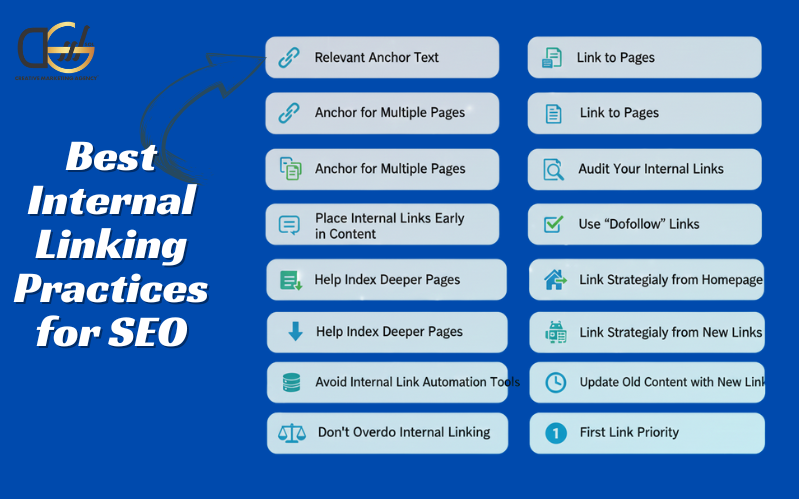
9. Avoid Internal Link Automation Tools
Automation tools can over-optimize anchors or link to irrelevant pages. Manual linking ensures contextual relevance and better SEO performance.
Pro Tip: Use automation to suggest links, but constantly review manually.
10. Update Old Content with New Links
Revisit your older posts and add links to newly published pages. This strengthens your content ecosystem, improves traffic flow, and boosts site authority.
Pro Tip: Each time you publish content, link to 2-3 new relevant posts.
11. Do not Overdo Internal Linking
When you add too many links, you dilute authority and overwhelm readers. It is essential to focus on 3–7 internal links per 1,000 words, emphasizing quality over quantity.
Pro Tip: Prioritize links that are genuinely useful and contextually relevant.
12. Be Mindful of First Link Priority
Search engines might favor the first link to the same destination. Make sure the primary anchor text appears early in the HTML for better SEO results.
Pro Tip: Repeatedly place links strategically, with the most important anchor first.
13. Use Topic Clusters and Content Silos
Organize your website around pillar pages and supporting content using internal linking for SEO. This creates content silos, improves topic relevance, and enhances search engine rankings. For example: Link all blog posts about “SEO strategies” back to a main “SEO Guide” pillar page.
Pro Tip: This method strengthens your site architecture and helps Google to recognize your authority in a niche.
14. Track Performance of Internal Linking
Monitor how users interact with your internal links using analytics tools. Track metrics such as:
- Click-through rate on internal links
- Engagement on linked pages
- Bounce rates and dwell time
Pro Tip: Adjust links based on performance to maximize SEO benefits.
Why Internal Linking Matters for SEO
Here are the DGSOL insights for proper internal linking which provides several benefits, which are:
- Crawlability & Indexing
Search engines like Google use internal links to discover new pages. A well-linked website ensures that even deep pages are indexed and ranked appropriately.
- Authority Distribution
Internal links pass link authority from high-ranking pages to other important pages, boosting their chances of ranking in search results.
- Content Relevance & Clustering
Linking related pages together builds topic clusters, signaling to Google that your site has depth and expertise in specific areas.
- User Experience & Engagement
Internal links guide visitors to related content, increase page views, reduce bounce rates, and improve dwell time, all critical SEO signals.
- Conversion Optimization
Strategically placed internal links can guide users toward high-value pages such as product pages, service pages, or landing pages, improving conversion rates.
Final Thoughts
Internal linking for SEO is a critical strategy for improving user experience, boosting search engine rankings, and strengthening your content ecosystem. A well-planned internal linking strategy ensures that link authority flows to priority pages, that content is easily discoverable, and that users remain engaged. At DGSOL Creative digital marketing agency UK, we specialize in implementing strategic internal linking as part of full-scale SEO campaigns, ensuring your content works harder to improve rankings, authority, and conversions.