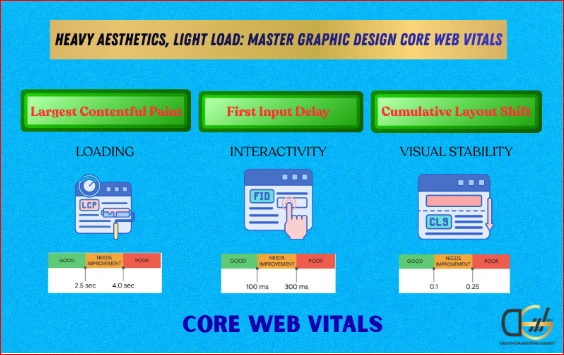
- Largest Contentful Paint (LCP) is the metric most commonly damaged by unoptimised texture and image assets
- Cumulative Layout Shift (CLS) is affected by design elements that load asynchronously without reserved dimensions
- Interaction to Next Paint (INP) is impacted by heavy JavaScript-driven animation and filter effects
Quick answer: Graphic design Core Web Vitals conflicts are almost always avoidable with the right production workflow. Dream Logic blur and grain effects can be delivered as lightweight CSS filters rather than heavy image files. Texture overlays can be compressed to a fraction of their original weight using AVIF or WebP formats without visible quality loss. The aesthetic does not need to be sacrificed. Only the production method needs to change.
Why Design Trends and Core Web Vitals Are on a Collision Course
Core Web Vitals are Google’s primary framework for measuring page experience. They feed directly into the search ranking algorithm and determine whether a technically sound page with excellent content ranks above or below a competitor whose page loads faster and shifts less.
The three metrics are Largest Contentful Paint, which measures how quickly the largest visible element on the page loads; Cumulative Layout Shift, which measures how much the layout moves unexpectedly as content loads; and Interaction to Next Paint, which measures how quickly the page responds to user input after the initial load.
- A good LCP score requires the largest content element to load within 2.5 seconds
- A good CLS score requires page elements to remain stable during loading, scoring below 0.1
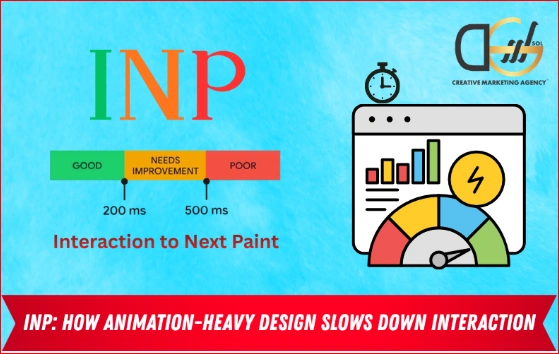
- A good INP score requires the page to respond to interactions within 200 milliseconds
The design trends of 2026 place specific pressures on each of these three metrics in ways that most designers and many marketing teams are not aware of until an SEO audit reveals the problem.
The LCP Problem: Why Dream Logic Hero Images Fail the Speed Test
The most common source of a failing LCP score in graphic design Core Web Vitals is the hero section. A full-width, high-resolution image with a grain or blur overlay is one of the most popular hero treatments in 2026. It is also typically the largest contentful element on the page, which means Google measures how quickly it loads and uses it to score the entire page experience.
There are two layers to the problem. First, the base image is often delivered at too high a resolution, particularly when the original asset came from a professional photographer or a design file at print resolution. Second, the texture or blur effect is frequently delivered as a second image layer stacked on top of the hero, adding another file weight to the initial load.
What Slows Down a Hero Image LCP
- Uncompressed PNG or JPEG files at resolutions above what the screen can render
- Texture overlay images delivered as separate files rather than as CSS-generated effects
- Images without defined width and height attributes, which prevent the browser from reserving layout space before the file loads
- Images not using the fetchpriority=high attribute, which tells the browser to load the hero before less important resources
- Images served without a Content Delivery Network, adding geographic latency for users far from the server location
The LCP Target and What It Means in Practice
A hero image that contributes to a page LCP above 2.5 seconds is in the needs improvement category. Above 4 seconds is classified as poor. Most unoptimised texture-heavy hero sections from 2026 design trends fall into the needs improvement category even on a fast connection, and into the poor category on a mobile connection. This directly suppresses the page’s position in Google’s search results regardless of how well the content and on-page SEO are executed.
When technical performance issues compound with on-page SEO factors, it can be hard to pinpoint exactly where your site is falling short. For UK businesses looking to resolve this, reviewing A Complete On-Page SEO Checklist to Boost Ranking is an excellent place to start.
Dream Logic Blur and Grain: How to Keep the Aesthetic, Fix the Score
The good news for UK designers and marketers who want to maintain texture-rich visual aesthetics without sacrificing search performance is that most of the production techniques negatively impacting Graphic Design Core Web Vitals have direct, aesthetically equivalent alternatives that perform significantly better.
Replace Image-Based Grain with CSS Grain
- A grain overlay delivered as a PNG file with transparency can weigh anywhere from 50KB to several hundred KB
- The same visual effect can be produced using an SVG-based turbulence filter applied as a CSS layer over the underlying image
- The SVG filter renders in the browser without any additional network request, adding zero weight to the page load
- The visual output of a CSS grain filter is indistinguishable from a PNG grain overlay to most users at typical viewing distances
Replace Image-Based Blur with CSS Backdrop Filter
- A pre-blurred version of an image delivered as a file is the heaviest way to deliver a blur effect
- The CSS backdrop-filter: blur() property applies a blur effect in the browser using the GPU, without requiring a separate blurred image file
- This approach works for overlay panels, frosted glass effects, and Dream Logic blur aesthetics without adding any image file weight
- The blur amount is adjustable in CSS, meaning the design can be adjusted without regenerating or re-uploading any image assets
Compress Texture Images to Modern Formats
- Any texture image that must be delivered as a file should be converted to AVIF or WebP format before deployment
- AVIF typically reduces file size by 50 to 70 percent compared to JPEG at equivalent visual quality for textured imagery
- WebP delivers similar compression benefits with broader browser support
- Most UK web hosting environments now support AVIF delivery natively, and image CDNs including Cloudinary and Imgix can serve the correct format automatically based on the requesting browser.
Design Trend vs Core Web Vitals Impact: A Practical Reference
The table below maps the most popular 2026 design trends against their typical Core Web Vitals impact and the recommended production approach that preserves the aesthetic without the performance penalty.
Here is the data formatted as a table for easy reading:
| Design Trend | CWV Impact | Primary Metric Affected | Performance-Friendly Alternative |
| Dream Logic blur hero | High | LCP | CSS backdrop-filter: blur() instead of pre-blurred image |
| Grain overlay texture | Moderate | LCP | SVG turbulence filter via CSS, zero additional file weight |
| Full-width film texture | High | LCP | AVIF or WebP format, compressed to under 200KB |
| Animated grain effect | High | LCP and INP | CSS animation on SVG filter, no JavaScript or image frames |
| Heavy collage layout | Moderate | LCP and CLS | Defined image dimensions and lazy loading for below-fold elements |
| Parallax scroll effects | Moderate | INP and CLS | CSS-only parallax using transform rather than JavaScript scroll events |
| Dark texture background | Low to Moderate | LCP | Tile-able compressed texture at small file size, CSS repeat |
| Video background loop | Very High | LCP | Replace with CSS-generated animation or poster image with lazy video |
CLS: The Layout Shift Problem That Design Teams Create Without Knowing
Cumulative Layout Shift measures visual instability during page load. It occurs when elements move on screen after the initial render, either because their dimensions were not defined in advance or because content loads asynchronously, causing other elements to become misaligned.
Images Without Defined Dimensions
- When an image element in the HTML does not have explicit width and height attributes, the browser cannot reserve the correct amount of space before the image loads
- As the image loads, it pushes surrounding content down, creating a layout shift that contributes to a high CLS score
- The fix is simple: every image element in the HTML must include explicit width and height attributes, even if CSS is used to make the image responsive
Web Fonts Loading Asynchronously
- Designs that rely on distinctive or heavyweight typefaces can cause text to render first in a fallback font and then shift when the custom font loads
- This font swap creates a measurable layout shift, particularly when the fallback and custom fonts have significantly different character widths or line heights
- Using font-display: optional or preloading critical fonts in the document head prevents the swap-related shift
Dynamically Injected Content
- Cookie banners, chat widgets, and promotional banners injected into the page after initial load push content down and create CLS
- These elements should be positioned as overlays rather than as in-flow content, or their space should be reserved in the initial layout before they load
One of the most frequently overlooked aspects of a standard site review is how technical performance issues compound to damage your search visibility. To systematically identify and prioritize these hidden problems across your entire website, you can use The Ultimate 18-Step SEO Audit Checklist for 2025.
INP: How Animation-Heavy Design Slows Down Interaction
Interaction to Next Paint replaced First Input Delay as a Core Web Vitals metric in March 2024. It measures the time between a user interaction, such as a click, a tap, or a keyboard input, and the next visible update to the screen that results from that interaction.
When evaluating Graphic Design Core Web Vitals, design-driven pages with heavy JavaScript-powered animations are particularly vulnerable to poor INP scores because animation scripts running on the main thread compete with interaction handling for processing time.
- JavaScript-driven scroll animations, parallax effects, and canvas-based visual elements all run on the main thread and can delay interaction response
- CSS animations and transitions run on the GPU compositor thread and do not compete with interaction handling. The same visual effect implemented in CSS rather than JavaScript will produce a significantly better INP score
- Third-party scripts, including chat widgets, marketing tools, and social share buttons, are among the most common sources of main thread congestion that suppresses INP scores on design-led pages
- Auditing the JavaScript load on any visually rich page should be part of the design handover process, not left as a post-launch discovery
Building a Performance-Aware Design Workflow
The most effective way to prevent Core Web Vitals failures in design-led projects is to integrate performance considerations into the design workflow rather than treating them as a post-production remediation task.
During the Design Phase
- Specify image formats and maximum file sizes within the design brief or handover document
- Identify which visual effects can be produced in CSS rather than as image files and specify this in the design notes
- Reserve explicit dimensions for all image placeholders in the design layout
- Flag any animation or interactive element that will require JavaScript and discuss the INP implications with the development team before the build begins
During the Build Phase
- Convert all raster images to AVIF or WebP before uploading
- Apply the fetchpriority=high attribute to the hero image element
- Implement lazy loading for all images below the fold
- Replace JavaScript-powered visual effects with CSS equivalents wherever possible
Preload critical fonts and specify font-display behavior in the CSS
Post-Launch
- Run a Core Web Vitals check using Google Search Console’s Page Experience report within the first week of launch
- Test on both desktop and mobile. Mobile scores are typically lower and are weighted more heavily in Google’s ranking decisions
- Address any failing scores before scaling paid traffic to the page
Design That Looks Great and Ranks Well: Where DGSOL UK Fits In
Most UK agencies treat design and SEO performance as separate disciplines. Design is handled creatively. Performance is handed to a developer after the fact. The result is visually strong websites that score poorly on Core Web Vitals and underperform in search despite excellent content and a well-built visual identity.
DGSOL UK bridges this gap for UK businesses that want design-led digital presences without sacrificing search performance for visual ambition. The production workflow at DGSOL integrates image format specifications, CSS-first animation decisions, and Core Web Vitals targets into the design and build process from the brief stage, not as a retrofit after launch.
For UK marketing teams navigating the tension between trend-led visual direction and technical SEO requirements, we provide the expertise to make both work together, rather than treating them as competing priorities.
Conclusion
Graphic design Core Web Vitals conflicts are not inevitable. The design trends of 2026, including Dream Logic blur, grain overlays, heavy textures, and animation-rich layouts, are entirely compatible with strong page performance when produced with the right workflow. CSS-generated grain and blur effects replace image-based equivalents with zero performance penalty. Modern image formats compress texture photography to a fraction of its original weight without visible quality loss. CSS animations run on the GPU without blocking interaction response.
The businesses that will benefit most are those that build awareness of Core Web Vitals into their creative process before pages go live, not those who discover the performance penalty after launch and spend the following months in a cycle of retrospective fixes. DGSOL UK builds visual identities and digital presences with both dimensions in view from the start.
Talk to DGSOL UK today about building design-led pages that look exceptional and perform exactly where it counts.
FAQs
What are Core Web Vitals and why do they affect design decisions?
Core Web Vitals are Google’s three performance metrics: Largest Contentful Paint (how fast the main content loads), Cumulative Layout Shift (how stable the layout is during load), and Interaction to Next Paint (how quickly the page responds to user input). They feed directly into Google’s ranking algorithm, which means design choices that increase file weight, cause layout instability, or slow interaction response directly affect search rankings.
Does using grain and texture effects always damage page speed?
No, but it depends on how they are produced. Grain and texture delivered as image files add weight to the page load. The same effects produced using CSS filters, SVG turbulence filters, or small tiled textures in modern image formats add minimal or zero performance impact. The aesthetic is identical to most viewers. The performance impact is substantially different.
What image format should UK designers use in 2026 for web output?
AVIF is the recommended format for photographic and textured images in 2026 because it delivers the smallest file sizes at equivalent visual quality. WebP is the fallback for environments where AVIF support is not yet complete. JPEG and PNG should only be used when neither AVIF nor WebP is available, or when the use case specifically requires lossless output.
What is the difference between CSS animations and JavaScript animations for performance?
CSS animations and transitions run on the GPU compositor thread and do not block user interaction. JavaScript animations run on the main thread and compete with interaction handling for processing time. For visual effects that can be achieved in CSS, using CSS instead of JavaScript produces consistently better Interaction to Next Paint scores without any reduction in visual quality.
How do I check my website’s Core Web Vitals score?
Google Search Console provides real-world Core Web Vitals data for indexed pages under the Page Experience report. Google PageSpeed Insights provides both lab data and field data for any URL. The Lighthouse tool in Chrome DevTools provides a detailed breakdown of which specific elements are causing performance issues and what to address first.
How does DGSOL UK approach the design-performance balance for UK clients?
We integrate Core Web Vitals targets into the design brief from the start. Image format specifications, CSS-first animation decisions, and performance thresholds are part of the design and build handover, not a post-launch audit. This means clients receive visually ambitious pages that perform well in search rather than discovering performance penalties after launch.